
This Huckleberry app review is based on around 10 months of using it with our daughter, tracking everything from naps and overnight sleep to feeds, nappies and medication.
We’ve also used the paid version and its SweetSpot sleep predictor, so this isn’t a review based on downloading an app and having a quick look around. We’ve actually relied on it as new parents, and it’s become part of our daily routine.
So, is the Huckleberry app worth it?
Quick verdict: Yes, we’d recommend Huckleberry, but we wouldn’t pay for Premium all year round. The free version is genuinely useful for keeping track of your baby’s day, while the paid sleep features were most helpful when we were inexperienced and struggling to work out nap timings.
As our daughter got older and we became more confident recognising when she was tired, we found ourselves needing SweetSpot less and less.
Here’s what we’ve liked, what we haven’t, and whether we’d spend the money again.
Our Huckleberry App Verdict
| Question | Our answer |
|---|---|
| Is Huckleberry worth downloading? | Yes, absolutely |
| Is the free version useful? | Yes, we still use it |
| Is SweetSpot worth paying for? | Yes, particularly during difficult sleep phases |
| Would we pay for Premium all year? | No |
| Would we pay for a few months when it’s needed? | Probably |
| Who is it best for? | New parents who want to track their baby’s routine and get help with sleep timings |
Our rating: 4.5/5
This is based on our experience as parents, rather than a technical assessment of every feature.
Hopefully, this Huckleberry app review helps you decide whether the free version is enough for your family or whether it’s worth paying for the additional sleep-tracking features.
What Is the Huckleberry App?
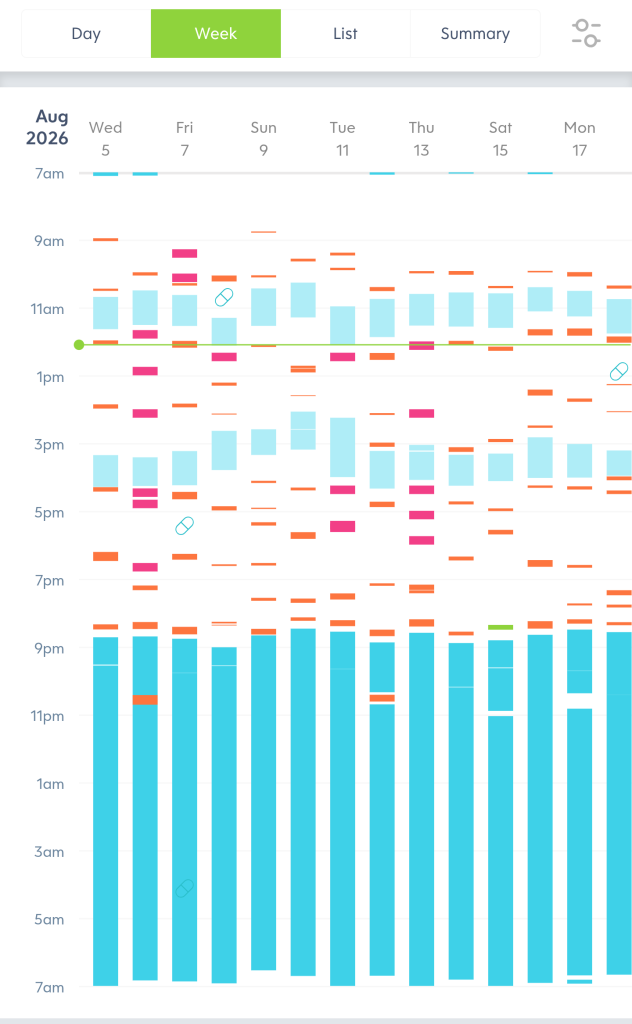
Huckleberry is a baby tracking app that lets you record pretty much everything happening throughout your baby’s day.
You can use it to track:
- Naps and overnight sleep
- Breastfeeding and bottle feeds
- Nappy changes
- Pumping
- Medication
- Growth and other activities
The idea is simple. Rather than trying to remember when your baby last slept, ate or had a nappy change, you record it in the app and have a running history to look back at.
You can also share the account between caregivers/parents, which is one of the things we’ve found most useful.
The app has a free version, as well as paid Plus and Premium subscriptions. The paid versions add extra sleep-planning features, including the well-known SweetSpot predictor.
How Much Does Huckleberry Cost in the UK?
One of the biggest questions people have is whether Huckleberry is free and how much the paid version actually costs.
There is a free version that you can continue using without subscribing. If you want the additional sleep-planning features, there are two paid options.
The UK App Store currently lists the following prices:
| Plan | Monthly price | Annual price |
|---|---|---|
| Free | £0 | £0 |
| Huckleberry Plus | £10.99 | £64.99 |
| Huckleberry Premium | £12.99 | £105.99 |
Prices and offers can change, so check the subscription screen in your app before paying.
What’s the difference between Free, Plus and Premium?
Free
The free version gives you the core baby tracking features. You can record sleep, feeds, nappies, medication and other daily activities.
For parents who mainly want to know when their baby last ate, slept or had a nappy change, this might be all you need.
Plus
Plus adds the more advanced sleep-tracking and planning features, including SweetSpot nap and bedtime predictions, along with additional insights and reports.
This is the subscription to look at if you’re particularly interested in getting help with your baby’s nap timings.
Premium
Premium includes the Plus features, along with other features such as personalised sleep plans and Berry, Huckleberry’s AI parenting assistant.
The important thing to understand is that you don’t need Premium just to use Huckleberry as a baby tracker.
For us, the biggest benefit of paying was having SweetSpot available during those early months when we were still trying to work out our daughter’s sleep routine.
The Shift-Change Debrief: Why Dads Need This App
The single best thing about Huckleberry for us has been how it streamlines the daily handover.
When I come in from work, I don’t need to fire off a barrage of questions asking how the day went. The debrief is completely silent.
Before Huckleberry, I’d have to ask:
- Has she slept?
- When did she last eat?
- Did she have a good nap?
- When did she last have Calpol?
With Huckleberry, I can open the app and see the day.
It’s basically our shared parental dashboard.
I open the app on my phone, scan the daily log, and immediately see if her naps went to plan or turned into a disaster, how regular her feeds have been, and whether medication has been recorded. I know what I’m walking into.
If there are two or three medicine entries on the timeline, I can see that Calpol has been given and that she’s probably had a rough day with teething.
As Mam started doing Keep In Touch (KIT) days and preparing to head back to work, having this shared record became even more useful.
We didn’t have to write everything down on a whiteboard or rely on remembering every little detail.
I could mentally prepare myself for what I was walking into and understand whether Mam had had a particularly frustrating day.
It’s a simple thing, but it’s made a difference to how we manage things together.
The SweetSpot Feature: Is Huckleberry Premium Worth It?
SweetSpot is probably the feature most people associate with Huckleberry.
It uses your baby’s age and recorded sleep patterns to suggest when the next nap might be a good opportunity for sleep.
When we first signed up as first-time, completely clueless parents with a reflux baby, Huckleberry gave us access to a free trial of its Premium features.
In those early, hazy weeks, SweetSpot was an awesome, well-thought-out feature.
We had absolutely no idea what we were doing. Sleep was all over the place, and we were trying to work out whether we were putting her down too early or leaving it too late.
SweetSpot gave us something to work from.
It saved us having to sit and count hours in our heads when we were both tired and stressed.
Was it always right? No. Like anything involving baby sleep, it was a guide rather than a guarantee. Every baby is different, and there are days when the suggested timing simply doesn’t fit what is happening.
But having a suggested window was reassuring when we were still learning.
The Catch: You Don’t Need Paid Features Forever
The reality is that once you become more confident with your baby’s routine, you might not need to pay for sleep predictions forever.
For us, Premium and Plus became much less useful around the eight-to-ten-month stage.
You don’t necessarily need a mobile app to tell you your baby is tired. Ours started making it pretty obvious herself by rubbing her eyes, yawning and getting properly grumpy.
Every baby is different, though.
If your baby’s sleep remains unpredictable, or you’re going through a major nap transition, you may get considerably more value from SweetSpot for longer.
I’d say it’s worth trying the paid features when you’re really struggling with sleep timings, rather than automatically paying for a full year.
Huckleberry Plus vs Premium: Which Would We Choose?
If you’re trying to decide between Plus and Premium, I’d start by asking what you actually want the app to do.
If you’re mainly interested in SweetSpot and getting help with nap and bedtime timings, Plus may be enough.
Premium makes more sense if you also want the additional personalised sleep plans and Berry AI features.
For us, the main attraction was SweetSpot. We weren’t paying because we desperately wanted an AI assistant or every extra feature available. I found Chat GPT and Gemini are just as good at answering random baby questions (and they’re free).
I’d be reluctant to recommend spending more than you need to.
If you’re unsure, start with the free version, see whether you get into the habit of logging everything, and then decide whether the paid sleep features would genuinely help.
The Work and Childcare Reality Check
We’re coming up on her first birthday soon, which is terrifying. Where on earth does the time go?
We’ve also started thinking about how much more complicated the daily routine becomes when your baby is being looked after by different people.
Mam is going back to work, both sets of grandparents are doing babysitting, and she’s starting nursery.
Once your child is being passed between:
- Mam
- Dad
- Grandparents (who usually aren’t great with smartphones)
- Nursery staff
Keeping Huckleberry updated in real time becomes much more difficult.
There is zero point in getting a notification on my phone at 2pm telling me it’s the perfect SweetSpot for a nap when she’s at nursery or with her grandparents and there’s nothing I can do about it anyway.
We just have to leave it to the nap gods!
When one or two parents control the day, Huckleberry is fantastic.
When four adults and nursery are involved, it’s much less useful as a real-time sleep-planning tool.
That doesn’t mean the app suddenly becomes pointless. The shared log can still be useful, but it does rely on everyone actually recording what happens.
It’s something I hadn’t really considered when we first started using it.
What We Like About Huckleberry
After using it for months, these are the things that have stood out to us.
1. The shared daily log
Being able to see what has happened throughout the day without having to ask a hundred questions is probably our favourite feature.
2. Tracking medication
It’s useful to have a record of when medication has been given, particularly when you’re both tired and trying to remember what happened earlier.
3. Sleep tracking
Having a record of naps and overnight sleep makes it easier to spot patterns and understand how the day has gone.
4. SweetSpot
During the early months, having a suggested nap window was genuinely helpful when we were still figuring everything out.
5. The free version
Even after using the paid features, we’ve continued using the free version. That’s probably the biggest compliment I can give it.
What We Don’t Like About Huckleberry
It’s not perfect, and there are a few things worth considering before downloading it.
1. The paid version can get expensive
At £10.99 a month for Plus and £12.99 a month for Premium, it’s not something we’d want to pay for indefinitely.
2. You can become too reliant on the predictions
SweetSpot is useful, but it shouldn’t dictate every nap. Babies don’t always follow a schedule, and sometimes you just have to go with what your baby is telling you.
3. It relies on people logging everything
The shared dashboard is only as useful as the information being entered. If different caregivers aren’t updating it, the picture of the day becomes incomplete.
4. You might outgrow the paid features
As your baby gets older and you become more confident with their routine, you may find that you don’t need the additional sleep predictions as much.
Is the Huckleberry App Worth It?
For us, absolutely.
But we wouldn’t pay for Premium forever.
The free version has been one of the most useful parenting apps we’ve used. Having a shared record of naps, feeds, nappies and medication made the daily handover between Mam and Dad much easier.
Premium was most valuable when we were inexperienced and her sleep was chaotic. SweetSpot gave us something to work from when we didn’t know whether we were putting her down too early or too late.
But after a few months, we’d learned her tired signs and established enough of a routine that we didn’t feel we needed to pay £10–£12.99 every month.
If you’re a first-time parent, I’d definitely recommend giving Huckleberry a go.
Start with the free version. If you’re struggling with sleep and want a bit more guidance, consider trying the paid features for a month or two.
You might find they’re exactly what you need. Equally, you might find that the free version does everything you want.
Would We Download Huckleberry Again?
Yes!
Would We Pay for Premium Again?
Yes, but probably only during a difficult sleep phase or a major nap transition.
Would We Recommend It to Other Parents?
Definitely. It’s been genuinely useful for our family, particularly for keeping both parents up to date with what’s happening throughout the day.
Just don’t feel that you need to pay for every feature to get value from it.
Frequently Asked Questions About Huckleberry
Is the Huckleberry app free?
Yes. Huckleberry has a free version that lets you track your baby’s sleep, feeds, nappies, medication and other activities. You can continue using the free version without paying for a subscription.
Is Huckleberry Premium worth it?
It can be, particularly if you’re struggling with your baby’s sleep and want additional guidance. We found SweetSpot most useful during the early months when we were still learning our daughter’s sleep routine. We wouldn’t personally pay for Premium all year round, though.
Is SweetSpot free on Huckleberry?
SweetSpot is part of Huckleberry’s paid subscription offering rather than the standard free tracking features. Check the current Plus and Premium subscription details in the app before subscribing.
What is the difference between Huckleberry Plus and Premium?
Plus includes SweetSpot sleep predictions and additional tracking insights. Premium includes the Plus features as well as additional features such as personalised sleep plans and Berry, Huckleberry’s AI parenting assistant.
Can both parents use Huckleberry?
Yes. Huckleberry supports caregiver access, allowing parents to keep up with the same tracking information across devices. We’ve found this particularly useful for keeping Mam and Dad on the same page.
Is Huckleberry worth paying for in the UK?
That depends on how much help you need with sleep. The free version is useful for everyday tracking, while Plus and Premium add extra sleep-planning features. We’d suggest starting free and only paying if you find yourself needing those extras.
Does Huckleberry guarantee better baby sleep?
No. SweetSpot provides suggested sleep windows based on the information recorded in the app. It can’t guarantee that your baby will fall asleep or stay asleep at a particular time. Treat it as a guide rather than a strict schedule.
More From North East Dad
If you’ve found this review useful, you might also like:
- Sleep Training a 10-Month-Old: Our 5-Day Experience
- Our Dad Daily Routine
- Weekend Routine With a Baby
- Fun 10-Month-Old Behaviour Changes
This is an independent review based on our family’s experience using Huckleberry. We haven’t been paid or sponsored to recommend the app.
4 thoughts on “Huckleberry App Review: Is Premium Worth It? (Our Experience)”